





 Sync to Pipedrive

 Omni


 Radar


 Distyl

 WellSaid

 Decagon

 Gamma
The short answer
Revenue operations software is the set of systems a RevOps team runs to manage revenue from first touch to renewal: the CRM, engagement and forecasting, data quality, lead routing, quoting and billing, commissions, and the automations that connect them. No single product covers all of it. Most B2B teams build on HubSpot or Salesforce and add tools where the CRM falls short, starting with clean data.
Most RevOps projects start with the data. Verify your contact list and clean the CRM records with Cleanlist AI (our product), then write the fixes back; the steps below show the credit costs. For how RevOps teams use it day to day, see Cleanlist AI for RevOps.
What is revenue operations software?
Revenue operations (RevOps) is the function that runs the systems, data and processes behind marketing, sales and customer success as one revenue engine. Revenue operations software is the tooling that function owns: the system of record for accounts and deals, plus the tools that keep the data accurate, route leads to the right rep, help reps engage and forecast, price and bill deals, and pay commissions.
The term names a stack. Vendors use it for their own slice of that stack: Gong for conversation and forecasting data, DealHub for quoting and billing, ZoomInfo for contact data. A more useful way to sort the tools is by the question each one answers for the revenue team, which is how the seven categories below are built.
RevOps software vs a CRM
The CRM holds the records: accounts, contacts, deals and activity. RevOps software is the CRM plus everything that feeds, cleans, routes and reports on those records. A small team can run RevOps inside HubSpot or Salesforce alone. As the team grows, data quality, routing and forecasting usually move into tools of their own.
RevOps vs sales ops vs marketing ops
| Function | What it owns | Typical tools |
|---|---|---|
| Sales operations | Territories, quotas, the sales process and sales tools | CRM administration, CPQ, commissions |
| Marketing operations | Campaigns, lead capture, scoring and attribution | Marketing automation, forms, attribution |
| Revenue operations | One data model and process across marketing, sales and customer success | CRM, data quality, routing, forecasting, reporting |
The 7 categories at a glance
| # | Category | The question it answers | Tools on this page | Prices, read November 10, 2026 |
|---|---|---|---|---|
| 1 | CRM | Where do accounts, contacts and deals live? | HubSpot, Salesforce | HubSpot free for 2 users, Sales Hub Starter from $7 a seat; Salesforce Starter Suite $25 a user |
| 2 | Engagement, conversation intelligence and forecasting | What is happening in each deal, and what will close? | Outreach, Salesloft with Clari Forecast, Gong | No published prices |
| 3 | Data quality and enrichment | Is the CRM data right and complete? | Cleanlist AI (our product), Clay, Insycle | Cleanlist AI from $49 a seat; Clay free, Launch $167 a month; Insycle from $100 a month |
| 4 | Lead routing and scheduling | Who gets this lead, and how fast do they meet? | LeanData, LeadAngel, Chili Piper, Default | Chili Piper Growth $1,250 a month; Default Growth $12,000 a year; LeanData and LeadAngel unpublished |
| 5 | CPQ, contracts and billing | How is this deal priced, signed and billed? | DealHub | No published price |
| 6 | Commissions | What does each rep earn, and why? | CaptivateIQ, QuotaPath | QuotaPath Growth $525 a month for 5 users plus $35 a user; CaptivateIQ unpublished |
| 7 | Integration and automation | How do the systems pass data to each other? | Zapier, HubSpot Data Hub | Zapier free, Pro $19.99 a month billed annually |
Disclosure: Cleanlist AI publishes this page, and our product appears in the data quality category. The categories follow the questions a RevOps team answers and are not ranked, and HubSpot, Salesforce, Outreach and Salesloft appear before Cleanlist AI. Every price was read on the vendor's own page on November 10, 2026.
1. CRM: the system of record
HubSpot
Price (read November 10, 2026): Sales Hub is free for up to 2 users. Starter starts at $7 a seat a month for new customers ($20 regular), Professional at $90 a seat billed annually plus a $1,500 onboarding fee, and Enterprise at $150 a seat plus $3,500 onboarding. Data Hub Professional is $720 a month billed annually, with 1 core seat and 5,000 HubSpot Credits.
HubSpot keeps marketing, sales, service and data tools on one CRM, so one admin can run most of the stack in one system. Sales Hub Professional adds forecasting, sequences and conversation intelligence. Data Hub adds data sync between HubSpot and other apps, cleanup and automation, with a Data Agent that HubSpot says updates records from your CRM and the web.
Best for: small and mid-sized teams that want one system and one admin.
Salesforce Sales Cloud
Price (read November 10, 2026): a Free Suite at $0 and Starter Suite at $25 a user a month, billed monthly or annually. Pro Suite is $100, Core $195, Advanced $395 and Max $550 a user a month, all billed annually. Agentforce for Sales is an add-on from $125 a user a month and is included in Max.
Salesforce suits teams with complex territories, products and approval paths, and it bends to almost any process with enough admin time. Several tools on this page are built around it: LeanData, for one, prices by the number of Salesforce users or queues.
Best for: teams with several products, regions or approval steps, and an admin to run them.
2. Engagement, conversation intelligence and forecasting
These tools capture what reps and buyers do and say, and turn it into deal data and a forecast.
Outreach
Price (read November 10, 2026): no published price. Outreach bills seats plus consumption-based AI credits, from Amplify Essentials with 10,000 AI credits to Amplify Pro with 100,000.
For RevOps, the top package matters most. Amplify Pro adds AI forecast projection, scenario planning, forecast rollups, territory management and parallel forecasts on top of sequences, conversation intelligence and deal agents.
Best for: sales-led teams that want engagement and forecasting in one platform.
Salesloft (with Clari Forecast)
Price (read November 10, 2026): no published price; the pricing page leads to a sales conversation.
Salesloft now includes Clari: clari.com redirects to salesloft.com, and Salesloft lists Clari Forecast next to Cadence, Conversation Intelligence, Deals, Rhythm, AI Agents and an MCP server that connects agents and systems through shared revenue context.
Best for: teams that want cadences, deal inspection and the forecast from one vendor.
Gong
Price (read November 10, 2026): no published price. Licenses are priced per user, plus a platform fee based on the number of users supported, and Gong's RevOps page says it offers tailored demos and guided tours in place of a free trial.
Gong captures calls, emails and meetings and turns them into deal data, so pipeline reviews read what buyers said along with what reps logged. Gong Forecast predicts revenue from live pipeline signals, and Gong Engage and Gong Enable cover outreach and coaching. Our Gong MCP server review covers connecting it to AI assistants.
Best for: teams that want the forecast and coaching built on conversation data.
3. Data quality and enrichment
Every other category reads the CRM, so bad data spreads: a duplicate account splits routing, a stale title breaks scoring, a dead email wastes a sequence. Tools in this category find, fix and fill the records. For the process around them, see CRM data management.
Cleanlist AI (our product)
Disclosure. We make Cleanlist AI. Its 98% verified email and 85% direct dial figures come from our own 500-lead benchmark, which named no other vendor.
Price: Free plan with 50 credits a month. Starter $49 and Pro $89 a seat a month, or $37 and $67 billed annually. HubSpot and Salesforce sync, the API and agents start on Pro.
Cleanlist AI keeps contact data current. It verifies emails at half a credit each and finds missing work emails at 1 credit and phone numbers at 10 through a waterfall of 25+ data providers, with nothing charged for a miss. On Pro, it imports records from HubSpot or Salesforce on a schedule and writes the enriched records back, and agents can rerun the job on a schedule or when a CRM record changes.
Our product
Cleanlist
Best for: lean GTM teams that want one platform in place of 3 to 5 tools: AI agents that find buyers, get verified emails and phone numbers from 25+ providers and send the sequences.
Cleanlist AI publishes this page. Accuracy figures are from our own benchmark, not a third-party test.
Cleanlist AI runs waterfall enrichment across 25+ data providers in sequence and stops at the first deliverable result, at 1 credit per verified work email and 10 per phone number. A missed email or phone number costs nothing. It returns 98% verified work emails and 85% phone numbers on the Cleanlist AI 500-Lead Enrichment Benchmark, which is our own test run on a 500-lead sample. Plans start at $49 per seat a month.
Clu, Cleanlist AI's GTM agent, turns one sentence into an agent that searches 1B+ profiles, enriches and verifies every person it finds, adds them to a sequence and posts each run to Slack, every week or on a CRM trigger.
- Product
- Plans
Free plan 50 credits a month. Starter $49 and Pro $89 per seat a month, and every seat adds its credits to one shared balance. Enterprise is custom. 25% off on annual billing.
- Credits
- Verified work email1
- Phone number10
- Both on one row11
- Validation0.5
- AI qualification5
- Trial
14 days of Pro, free: 250 credits, 3 seats, agents, Sequences and Clu in Slack.
- Fits when
- Your CRM holds contacts with missing, old or unverified emails and phone numbers
- You want enriched records written back to HubSpot or Salesforce on a schedule, with no CSV round trip
- You want one credit balance for the team, with nothing charged when a lookup finds nothing
- Pairs with
- A dedupe tool such as Insycle, or your CRM's own duplicate rules, for merging records
- Your routing tool, which needs a domain and an owner on every record
- Your intent or signal vendor, if buying-stage scoring is part of your motion
Clay
Price (read November 10, 2026): free with 500 actions and 100 data credits a month. Launch is $167 a month and Growth $446 a month, billed annually; Clay's FAQ lists $185 and $495 for monthly billing. CRM sync starts on Growth.
Clay is a workspace for building data workflows, with waterfall enrichment across providers and Claygent research agents on every plan. Growth adds auto-sync and enrichment of your CRM and HTTP API integrations.
Best for: RevOps teams with someone who likes to build their own enrichment logic.
Insycle
Price (read November 10, 2026): from $100 a month billed annually for Starter, with one module, to $200 for Professional, with all modules, at the record count the page shows by default. Enterprise is custom above 500,000 records.
Insycle merges duplicates, standardizes values and bulk-updates HubSpot and Salesforce records, with a health assessment of your data and an audit trail of every change.
Best for: admins who clean CRM data on a schedule.
4. Lead routing and scheduling
Routing decides which rep gets each lead and account, and scheduling books the meeting while the buyer is still on your site. Our lead routing software comparison goes deeper.
LeanData
Price (read November 10, 2026): no published price. LeanData says package pricing is based on features, objects and the number of Salesforce users or queues, and implementation is billed separately.
LeanData matches leads to accounts and routes leads, contacts and accounts by round robin, territory and account-based rules, in Standard, Advanced and Premium editions. BookIt adds scheduling from forms, handoffs and links.
Best for: Salesforce teams with account-based routing rules.
LeadAngel
Price (read November 10, 2026): no published price; the Professional and Professional Plus plans lead to sales.
LeadAngel automates lead-to-account matching and routing. Professional Plus adds routing for contacts, accounts and opportunities, data dedupe and ScheduleNow scheduling for web forms and handoffs. Its feature tables list Salesforce, Microsoft Dynamics 365 and HubSpot.
Best for: teams that want matching, routing and dedupe from one vendor.
Chili Piper
Price (read November 10, 2026): billed annually only. Growth is $1,250 a month ($15,000 a year) with 15 seats included, then $45 a seat; Scale is $3,500 a month ($42,000 a year) with 30 seats, then $50 a seat. Enterprise is volume priced from 250 seats.
Chili Piper books meetings from forms, routes and assigns leads, schedules handoffs between reps and distributes leads evenly. Scale adds chat AI, visitor and account identification and personalized messages for visitors.
Best for: inbound teams that want a form fill to become a booked meeting.
Default
Price (read November 10, 2026): Growth is $12,000 a year with 24,000 enrichment credits and 200,000 workflow runs; Enterprise is $25,000 a year. Routing and scheduling seats are $540 a user a year, or $240 for scheduling alone.
Default runs inbound forms, website visitor identification, enrichment, routing and scheduling in one platform, with research agents, an MCP server and an API.
Best for: inbound teams that want forms, enrichment and routing from one vendor.
5. CPQ, contracts and billing
DealHub
Price (read November 10, 2026): no published price; the Growth and Scale tiers lead to a pricing request.
DealHub covers quoting with pricebooks and approvals (CPQ), contracts (CLM), DealRoom proposals with e-signature, subscriptions and renewals, and billing with usage-based invoicing and revenue recognition. It connects to Salesforce, HubSpot and Microsoft Dynamics 365.
Best for: subscription businesses that want quote to cash in one system.
Before you add a CPQ tool, check what quoting your CRM plan already includes.
6. Commissions
CaptivateIQ
Price (read November 10, 2026): no published price. CaptivateIQ says pricing depends on the number of payees, plan complexity and integrations, with seats for admins and payees and a one-time setup fee.
CaptivateIQ automates commission calculations and covers quota setting and territory planning.
Best for: finance and RevOps teams with complex compensation plans.
QuotaPath
Price (read November 10, 2026): Growth is $525 a month covering the first 5 users, plus $35 a user a month after that; Premium is $800 a month plus $50 a user. Both are billed annually.
QuotaPath builds commission plans with an AI plan builder, forecasts commissions and runs approvals through to payouts, with integrations for HubSpot, Salesforce and other CRMs. Premium adds plan modeling, multi-level approvals and payroll sync.
Best for: growing teams that want commissions out of spreadsheets at a published price.
7. Integration and automation
Zapier
Price (read November 10, 2026): free for 100 tasks a month. Pro is $19.99 a month billed annually ($29.99 monthly) for 750 tasks, and Team is $69 a month billed annually ($103.50 monthly) for 2,000 tasks. Enterprise is custom.
Zapier connects apps without code: when something happens in one tool, a Zap takes an action in another. RevOps teams use it for the gaps between native integrations, such as posting closed deals to Slack. Inside HubSpot, Data Hub's data sync covers many of the same jobs.
Best for: small teams with simple handoffs between tools.
How to choose revenue operations software
Buy in the order the data flows. A tool downstream cannot fix what an upstream tool gets wrong.
- The CRM. Settle the system of record first, and write down who owns each field.
- Data quality. Clean and enrich what is already there before you route or score it.
- Routing and scheduling. Once every account has a domain and an owner, route new leads to the right rep.
- Engagement and conversation data. Give reps sequences and call capture that write back to the CRM.
- Forecasting. Add it once stages and close dates are kept honest.
- CPQ, billing and commissions. Add them when pricing or compensation outgrows spreadsheets.
Before you sign, ask every vendor the same five questions.
| Check | What to ask |
|---|---|
| CRM integration | Does it write to standard CRM objects, and which fields? |
| Pricing model | Seats, platform fee, credits or usage, and what happens at the limit? |
| Admin effort | Who sets it up, how long does it take, and is implementation billed separately? |
| Data ownership | Can you export everything if you leave? |
| AI controls | What can its agents change without approval, and is there an audit log? |
What a RevOps stack costs: a 25-rep example
One example stack for a B2B company with 25 reps on HubSpot, priced from the list prices read on November 10, 2026. Tools without a published price are left out of the arithmetic.
| Category | Tool and plan | Monthly cost |
|---|---|---|
| CRM | HubSpot Sales Hub Professional, 25 seats, billed annually | $2,250, plus $1,500 one-time onboarding |
| Data quality | Cleanlist AI Pro, 2 seats for the RevOps team | $178, with 3,000 credits shared |
| Routing and scheduling | Chili Piper Growth, 25 seats | $1,700 ($1,250 for 15 seats plus 10 at $45) |
| Commissions | QuotaPath Growth, 25 users | $1,225 ($525 for the first 5 plus 20 at $35) |
| Automation | Zapier Team, billed annually | $69 |
| Total | $5,422 a month, plus $1,500 once |
The 3,000 Cleanlist AI credits verify 6,000 emails a month at half a credit each, or fill 3,000 missing work emails at 1 credit each. Engagement and forecasting from Outreach, Salesloft or Gong would come on top, at prices those vendors quote.
Clean and verify CRM data with Cleanlist AI, step by step
Here is the job every category depends on, done with Cleanlist AI, with what each step costs.
- Start the trial. Every new Cleanlist AI workspace starts with a 14-day Pro trial: up to 3 seats and 250 credits, plus 100 more when you register with a work email. A card is required.
- Bring in the records. On Pro, connect HubSpot or Salesforce, and Cleanlist AI imports records from it on a schedule. On other plans, export the contacts as a CSV.
- Verify the emails. Upload the list on verify contact list or run it in the workspace: an SMTP mailbox check with catch-all detection, at half a credit an address.
- Fill the gaps. For contacts with no email or phone, Cleanlist AI asks 25+ data providers in sequence: 1 credit per verified work email, 10 per phone number, nothing for a miss.
- Write it back. On Pro, the enriched records go back to HubSpot or Salesforce. Clean CRM data walks through the full cleanup.
- Make it recurring. On Pro, an agent can rerun the job on a schedule or when a CRM record changes, with up to 5 active agents. Clu, Cleanlist AI's GTM agent, charges credits for its own work, priced by the AI model a task runs on.
What it costs: verifying 10,000 contacts is 5,000 credits. One Pro seat at the 5,000-credit level is $229 a month, or a one-off top-up of 5,000 credits is $229, shared with the team and never expiring. A single address can be checked free with the email verifier, 2 checks per IP every 30 days.
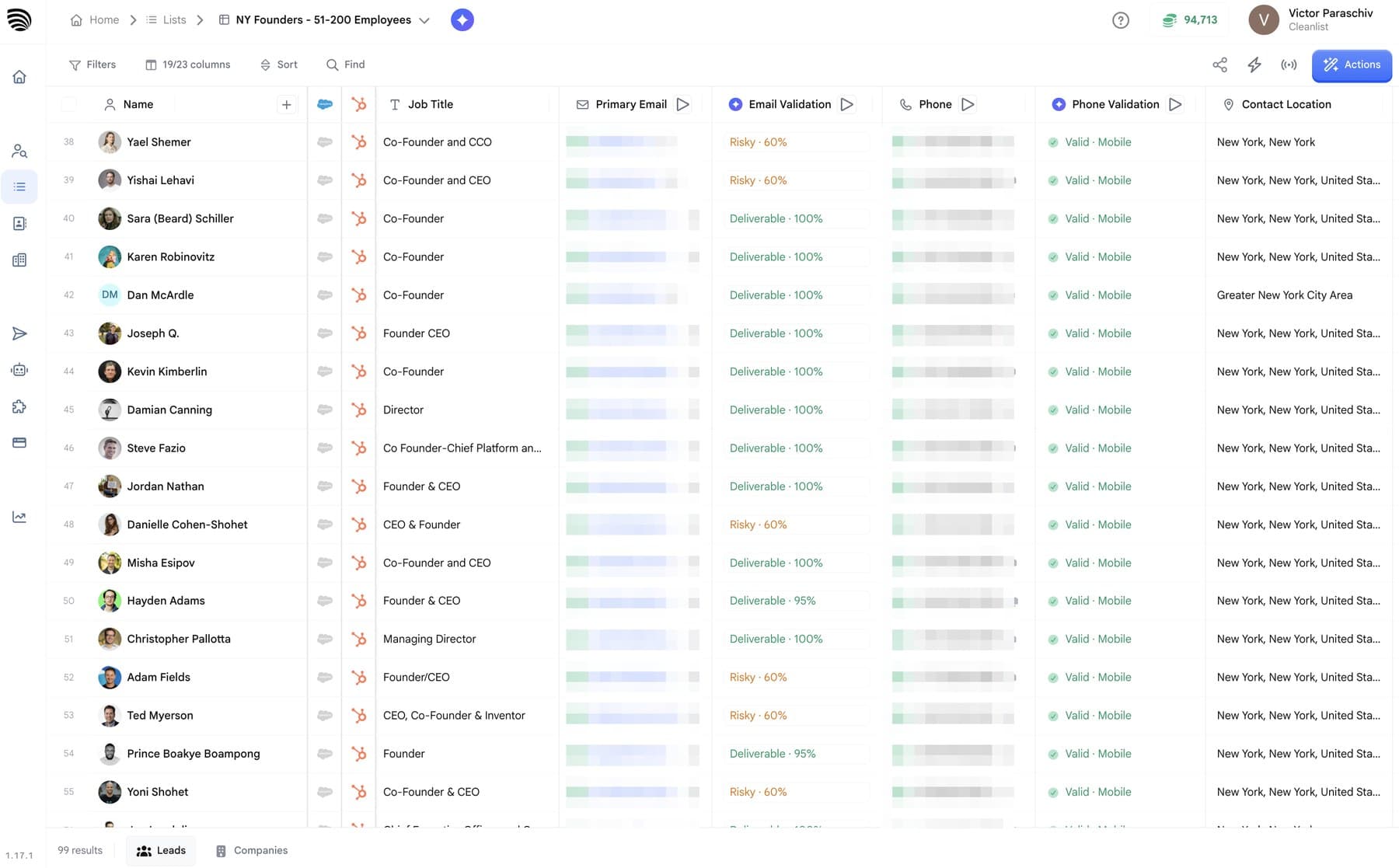 Cleanlist AI verification output: per-contact deliverability scoring beside phone validity
Frequently asked questions
What is the best software for revenue management?
For a B2B RevOps team, the CRM is the core: HubSpot for teams that want one system and one admin, Salesforce for complex territories and approvals. Then add the category that hurts most, usually data quality or routing. In hotels and airlines, "revenue management" means pricing software, which is a separate category.
What are the four pillars of revenue operations?
There is no official list. A common version names people, process, technology and data: the team that owns RevOps, one process from lead to renewal, the systems on this page, and a clean data model they all read. Some vendors use other words, such as platform or insights, for the same ideas.
What are revenue operations in SaaS?
In a SaaS company, RevOps runs the systems and data behind the whole subscription: new business, expansion and renewal. It owns the CRM, routing, forecasting and the quote and billing handoffs, plus the metrics finance and the board ask for, such as pipeline coverage, win rate and net revenue retention.
How much does revenue operations software cost?
From free to six figures a year. Of the prices read on November 10, 2026, Zapier and HubSpot have free plans, Chili Piper's entry plan is $15,000 a year and Default's is $12,000 a year, and Gong, Outreach, Salesloft, LeanData and DealHub quote on request. Budget for implementation too, which some vendors bill separately.
Who should own revenue operations software?
One team, usually RevOps, should approve every tool that writes to the CRM, own the field definitions and keep a map of the integrations. Sales, marketing and customer success ask for changes, and RevOps decides how they reach the data. Without one owner, each team buys its own tools and the records drift apart.
References & Sources
- [1]
- [2]
- [3]
- [4]
- [5]
- [6]
- [7]
- [8]
- [9]
- [10]
- [11]
- [12]
- [13]
- [14]
- [15]
- [16]
- [17]
- [18]

 Omni

 Decagon

 Distyl

 Sync to HubSpot

 Sanity
