





The short answer
A business lead list is a list of companies and the people to contact at each one, with a work email or phone number per person. You can buy one from a list broker or a contact database, or build one from your ideal customer profile and verify every contact before the first send. Buying saves a few days. Building usually costs less per contact you can actually use, because you choose every account and pay only for verified results. Either way, CAN-SPAM covers business email in the US, and in the EU and UK you must be able to show where the data came from.
Ready to build one? The contact finder finds the people at a company, and the email finder turns a name and a company into a verified work email, both inside a free workspace of Cleanlist AI (our product).
Where do business lead lists come from?
Every list you can buy or build comes from one of four places. The examples in the last column come from each seller's own page, read on November 10, 2026.
| Source | What you get | How you pay | How fresh it is | Examples |
|---|---|---|---|---|
| List brokers and compilers | A file of businesses, often with one named contact, picked by industry, size and location | Per file or per record, usually by quote | As fresh as the seller's last update | Salesgenie (Data Axle) says it covers 25M+ businesses. TargetLeads lists 14M+ US businesses and Melissa 14M+ companies with monthly updates. Experian offers free counts and instant downloads after a free registration. None of the four prints a price on its list page |
| Contact databases | People you search and export, with emails and phone numbers | A subscription with monthly credits, about one credit per contact | Refreshed on the vendor's schedule | UpLead Essentials is $99 a month for 170 credits, or $74 a month billed annually. Lead411 starts at $49 a month. ZoomInfo and Cognism give prices on request |
| Email database files | A one-time file of email addresses by title, industry or region | Per record or per thousand | Checked, if at all, on the seller's last run | Many brokers sell them beside mailing lists: Melissa's list page, for one, links to business email lists |
| Built on demand | The accounts and roles you choose, with contact data found and checked when you ask | Per verified result | Checked at the moment of lookup | Cleanlist AI (our product): search is free, a verified work email is 1 credit, a phone number is 10, and a miss costs nothing |
A "B2B email database" is sold in two shapes. A file you download once is cheaper to start and ages from the day it ships. A database subscription costs more each year and the vendor refreshes it, though every export you take is a snapshot that ages in your CRM. Our B2B contact database comparison prices eight of the subscriptions.
Should you buy or build a business lead list?
| Bought file | Built list | |
|---|---|---|
| Who is on it | Whoever matched the seller's filters | The accounts and roles you picked |
| Fit to your ideal customer profile | Rough: brokers filter by industry codes and size bands | As close as your filters and your review |
| Email status | Verified on the seller's schedule, if at all | Verified at lookup |
| Age on day one | As old as the last compile | Current at lookup |
| Who else has it | Every other buyer of the same file | Only your team |
| What you pay for | Every row, including the ones that bounce | With a pay-per-result tool, verified contacts only |
| Speed | Same day | Hours to days, by list size |
| Paperwork | You need the seller's answers on sourcing | You know your sources and dates |
Buying makes sense in a few cases: a direct mail campaign to local businesses, a broad small-business market where industry codes are the right filter, or a quick test of a new market before you invest in building. For cold email and calls to a defined set of accounts, a built list wins on most rows of that table. That is our view, and the arithmetic below is how to test it on your own quote.
What does a bought list cost per usable contact?
Price per row tells you little. The number that matters is the cost per usable contact: a person who fits your ideal customer profile, still works there, and has an address that delivers.
Cost per usable contact = total price ÷ (rows bought × share that fits your profile × share that delivers)
The example below is made up to show the arithmetic. The Cleanlist AI prices are real.
- The bought file. A broker quotes $0.20 a row, and you buy 5,000 rows for $1,000. You verify the file and 80% of the addresses deliver. You review it and 65% of the rows fit your profile. That leaves 2,600 usable contacts at about 38 cents each, plus 2,400 rows you paid for and cannot use.
- The built list. You search for the same accounts and roles in Cleanlist AI, which costs 0 credits, and keep the 2,600 people who fit. Say a verified email comes back for 90% of them: 2,340 emails at 1 credit each, and the misses cost nothing. Pro with 3,000 credits for one seat is $149 a month, which covers the whole list at about 6 cents per verified contact.
- What the example leaves out. Time, for one: the file arrives the same day, while the built list takes a few hours of review. A broker's file can also hold companies you would not have thought to search for.
What our tests say about the share that delivers. We have published three tests, all first-party. In our 1,000-lead test in March 2026, which had no Cleanlist AI arm, ZoomInfo returned a verified email for 84% of leads and Apollo for 78%, so even the large databases leave gaps. Our 100-lead test ran one list through the Cleanlist AI waterfall and through Apollo alone, returning 98% verified email and 85% phone for the waterfall against roughly 80% and 45% for Apollo. And the waterfall returned 98% verified work emails and 85% phone numbers on the Cleanlist AI 500-Lead Enrichment Benchmark, our own test run on a 500-lead sample. The benchmark write-up has the method.
Run the same arithmetic on your own quote. If a seller will not tell you how much of the file was verified, or will not let you test a sample, plan for the worse case.
Why do bought lead lists bounce?
A bounce means the address no longer exists or never did. Bought files bring bounces, spam complaints and wasted sends, for five reasons:
- Age. People change jobs, and their old address dies with the job (more on this below).
- Guessed addresses. A file can hold addresses built from the company's pattern, such as first.last@, that nobody checked against the mailbox.
- Catch-all domains. Some companies accept mail for any address, so a mailbox check cannot confirm the person, and a seller may count those rows as valid.
- Shared inboxes. Addresses such as info@ and sales@ reach a team inbox, where cold email rarely gets a reply.
- Shared files. Other buyers mail the same people, so recipients are more likely to mark you as spam.
Mailbox providers watch for exactly this. Google's email sender guidelines tell senders not to buy email addresses from other companies, to unsubscribe recipients after multiple bounced messages, and to keep the spam rate in Postmaster Tools below 0.3%, with 0.1% as the target (Google Workspace Admin Help, read November 10, 2026).
Check any list before the first send, bought or built. The email verifier checks single addresses free, 2 per IP every 30 days, and the email list cleaner shows how to strip duplicates, shared inboxes and typos from a file. Inside a workspace, Cleanlist AI verifies a list at half a credit an email.
How fast does a business lead list go out of date?
Every job change breaks a row. The US Bureau of Labor Statistics found that the median wage and salary worker had been with their current employer for 4.1 years in January 2026, and 4.9 years in management, professional and related jobs, the roles most lead lists target (BLS Employee Tenure, released September 24, 2026). Half of those managers had been in place for 4.9 years or less, and each of their eventual moves leaves an old email and title behind in somebody's file.
A file compiled six months before you buy it has been aging the whole time. Ask for the compile date first, and verify any list again shortly before you send. Our B2B data decay statistics collect the published decay rates by industry, and the data decay glossary entry defines the term.
Is it legal to buy a business lead list?
No US, EU or UK law bans buying a business contact list outright. What the law regulates is where the data came from and how you use it. What follows summarizes what each regulator says. It is not legal advice.
United States: CAN-SPAM
The FTC says CAN-SPAM "makes no exception for business-to-business email". Every commercial email needs accurate header information, a subject line that matches the content, a clear statement that it is an ad, your valid postal address and a working way to opt out, and you must honor an opt-out within 10 business days. Hiring a vendor to send for you does not move the responsibility, and each email that breaks the law can cost up to $53,088. Once someone opts out, you cannot sell or transfer their address, and the FTC lists harvesting addresses, or generating them through a dictionary attack, among the practices that can bring criminal penalties (FTC compliance guide, dated August 2023 and edited January 2024 for the penalty amounts, read November 10, 2026).
European Union: GDPR
The European Commission's guidance for businesses is direct. Before you acquire a contact list from another organization, that organization must be able to show it collected the data in line with the GDPR and that the data may be used for advertising. You must keep the list up to date, never send ads to people who objected, follow the ePrivacy rules if you send email, and tell people, at the latest in your first message, that you collected their data and will use it for ads. Anyone can object to direct marketing at any time, and then you must stop (European Commission, data protection guidance for businesses, read November 10, 2026). Each EU country writes its own email marketing rules under the ePrivacy Directive, so check the rules of the country you send to.
United Kingdom: UK GDPR and PECR
The ICO says UK GDPR applies whenever you hold a named business contact, and that anyone who buys a list of business contacts needs a lawful basis and must tell people it has their data. Under PECR, the email consent rule does not apply to corporate subscribers such as companies and limited liability partnerships, though you must say who you are and give a valid address to opt out. Sole traders and some partnerships count as individuals, so you need their consent or a soft opt-in, and a buyer who emails them without consent given to that buyer breaks PECR. Before calling, screen numbers against the TPS and the CTPS (ICO business-to-business marketing guidance, version of October 11, 2026, which the ICO marks as under review after the Data (Use and Access) Act). Our UK B2B data providers guide covers the UK rules in more depth.
Canada's CASL and California's privacy law add their own rules, and our lead list guide summarizes both.
What should you ask before you buy a lead list?
Ask these ten questions, and get the answers in writing:
- Where did each record come from? Public websites, registries, surveys and partner data all count. "Proprietary sources" is not an answer.
- When was each email last verified, and how? A mailbox check differs from a pattern guess.
- What bounce rate will you replace or refund above? A seller who trusts the file will name a number.
- How many other buyers get the same file?
- How long can you use it? Once, for a year, or forever, and what happens to the data when the license ends.
- Which fields are included? A named contact, title, direct dial, LinkedIn URL and company domain each change what you can do with a row.
- How are opt-outs handled? Ask whether the seller removes people who objected and whether you get its suppression list.
- For EU and UK records, what is the lawful basis, and were people told?
- Can you test a sample of your own target accounts before paying? A seller's showcase sample tells you little.
- Is the seller registered as a data broker where the law requires it? Lead411's footer, for example, says it is a registered data broker under state laws, including Texas law (read November 10, 2026).
How do you build a business lead list?
Building takes six steps, and none needs a list broker:
- Write your ideal customer profile as filters: industry, headcount band, location and the titles that buy. Our ICP in sales guide shows how to build it from your closed deals.
- Search companies and people, and keep one to three people per account.
- Find each person's work email, plus a phone number for the people you plan to call.
- Verify every address before the first send.
- Remove customers, open deals and anyone who opted out.
- Load the list into your CRM or sequencer with the source and date on every row.
Our step-by-step lead list guide covers each step with the columns to keep, and the cold calling lists guide covers phone lists and the US calling rules.
Build a business lead list in Cleanlist AI (our product), step by step
Disclosure. We make Cleanlist AI. Its 98% verified email and 85% direct dial figures come from our own 500-lead benchmark, which named no other vendor.
Cleanlist AI runs waterfall enrichment across 25+ data providers in sequence and stops at the first deliverable result, at 1 credit per verified work email and 10 per phone number. A missed email or phone number costs nothing. It owns no database: each record is assembled from provider partners when you ask for it, which is why it is checked at that moment.
- Pick the accounts. In Company Search, filter by industry, employee count, location and funding stage. Searching costs 0 credits.
- Pick the people. Describe your buyer in a sentence to Clu, Cleanlist AI's GTM agent, or set the filters in People Search yourself. It searches 1B+ profiles, also at 0 credits.
- Get verified contact details. Each person runs through 25+ providers until one returns a deliverable result. A verified work email is 1 credit, a phone number 10, and a lookup that finds nothing costs nothing.
- Start from names you already have. For one person, use the email finder or the contact finder. For a whole file, upload the CSV.
- Check a list you already own. Run it through the email verifier, or verify it inside a workspace at half a credit an email.
- Send or sync. From Starter, add the people to a Cleanlist AI sequence that sends from your own inbox. On Pro, sync them to HubSpot or Salesforce, or have agents push them to Salesloft or Lemlist.
What it costs: every new workspace starts with a 14-day Pro trial with up to 3 seats and 250 credits, plus 100 more when you register with a work email, and a card is required. After that, Starter is $49 a seat a month with 750 credits a seat, Pro is $89 with 1,500, and the Free plan keeps 50 credits a month.
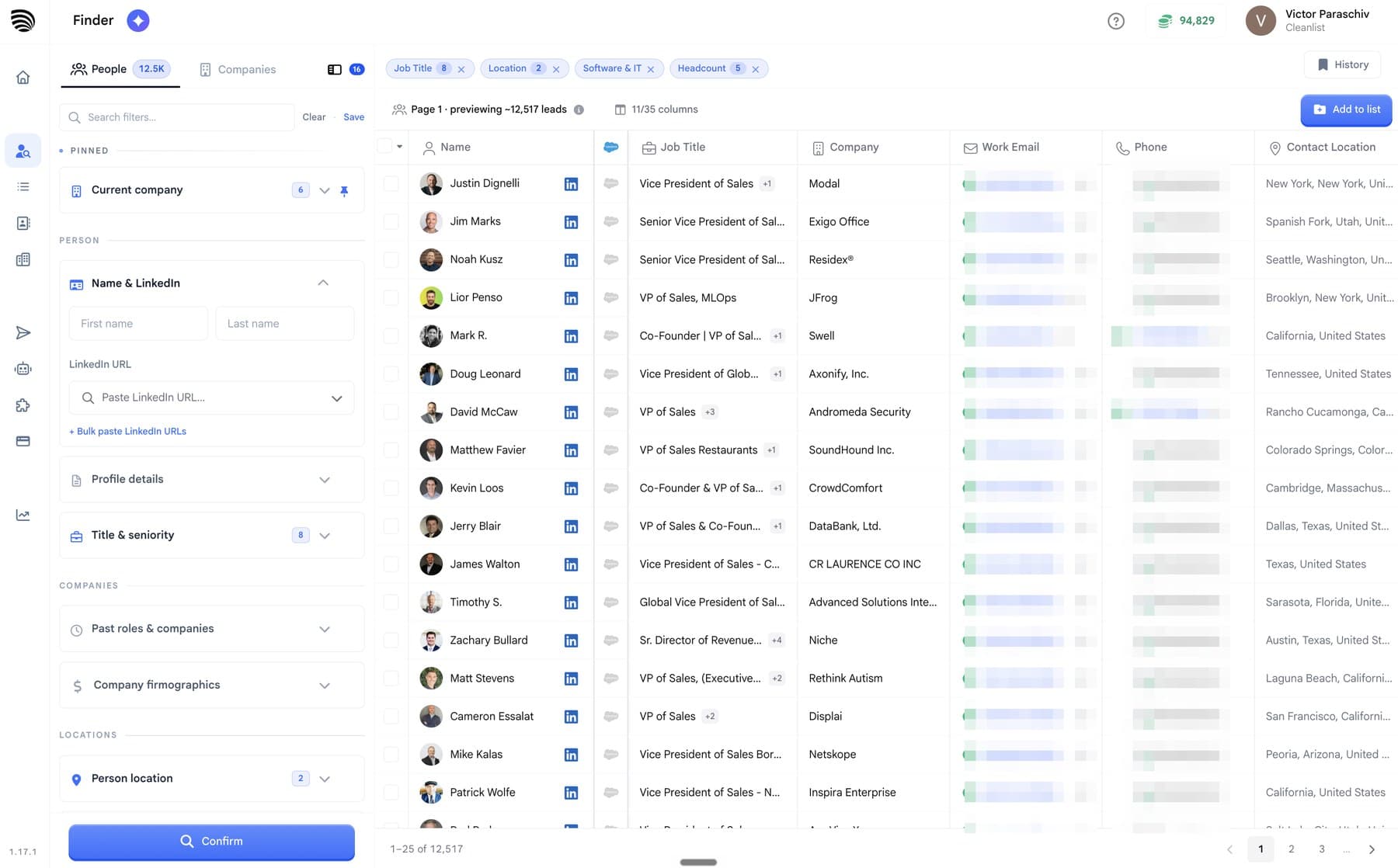
 A Cleanlist AI list of 99 New York founders with company, job title, LinkedIn URL, email and phone columns filled in, the contact details blurred
Frequently asked questions
What should a business lead list include?
At minimum: company name, company domain, the person's name and title, a verified work email and the date it was checked. Add industry, headcount and location for segmenting, a phone number with its line type for calling, a LinkedIn URL for research, and the source of each row so you can answer a "where did you get my data?" request.
What is the difference between a lead list and a mailing list?
A mailing list holds people who asked to hear from you. A lead list holds people you chose to contact. The difference matters twice: people on a mailing list expect your email, so it lands better, and in the EU and UK a lead list needs a lawful basis and a notice telling people you hold their data.
Are free business lead lists worth using?
As a list of companies, often yes. Trade association directories, exhibitor lists and public registers name real businesses. In the UK, Companies House makes registered company information public and lets anyone search by company or officer name. Free lists rarely include verified work emails, so use them to pick accounts and find the people yourself.
Is buying a list a better fit for direct mail?
Usually, yes. A company's postal address tends to outlast the people who work there, so a mailing file decays more slowly than an email file, and CAN-SPAM does not apply to postal mail. Ask the seller when the addresses were last checked, and remember that a named recipient on the envelope is still personal data in the EU and UK.
How many contacts should a business lead list have?
Enough for one campaign you can follow up properly. As a rule of thumb, start with one segment of 200 to 500 people, learn what gets replies, then widen the filters. A list larger than your team can follow up on turns personal outreach into bulk email, which is when spam complaints rise.
References & Sources
- [1]
- [2]
- [3]
- [4]
- [5]What happens if someone objects to my company processing their personal data?· European Commission(2026)
- [6]
- [7]

 Omni

 Decagon

 Distyl